The SUCHAI 4 is a 3U nanosatellite developed by the Space and Planetary Exploration Laboratory (SPEL) at the University of Chile. As part of our commitment to open science, we encourage the amateur radio community to track and decode our beacons. This tutorial provides a step-by-step walkthrough to transform raw radio signals into meaningful telemetry data.
Technical Specifications
To set up your ground station or SDR software, use the following parameters:
- Radio: Nanocom AX100
- Modulation: GMSK (Mode 5)
- Bitrate: 4800 bps
- Frequency: 437.250 MHz (Same as SUCHAI-2/SUCHAI-3)
- Beacon Interval: Every 120 seconds
- Framing: ASM+Golay (Standard for AX100 mode 5)
Prerequisites
Before starting, ensure you have the following tools installed:
- Install GNU Radio and gr-satellites.
- Installation:
sudo apt install gnuradio gr-satellites(on Debian/Ubuntu) or follow the official build guide.
- Installation:
- Get the SUCHAI 4 parser:
- Download the .py file: suchai4.py
- Download the .yml file: SUCHAI-4.yml
- Copy the
suchai4.pyfile to your gr-satellites installation, e.g.:/usr/lib/python3/dist-packages/satellites/telemetrysudo cp suchai4.py /usr/lib/python3/dist-packages/satellites/telemetry/
- Copy the
SUCHAI-4.ymlfile to your gr-satellites installation, e.g.:/usr/lib/python3/dist-packages/satellites/satyamlsudo cp SUCHAI-4.yml /usr/lib/python3/dist-packages/satellites/satyaml/
- Edit the
/usr/lib/python3/dist-packages/satellites/telemetry/__init__pyfile by adding the following linefrom .suchai4 import suchai4-
For example:
  from .upmsat_2 import upmsat_2
  from .vzlusat_2 import vzlusat_2

  from .suchai4 import suchai4

  construct.setGlobalPrintFullStrings(True)
- Kaitai Struct IDE: A web-based tool to parse binary structures.
- Access it at: ide.kaitai.io
Decode audio observations
Step 1: Obtain Observations
If you don’t have your own station, you can use data provided by the global SatNOGS network:
- Visit the SUCHAI 4 SatNOGS Observations page.
- Look for observations marked as “Data” or “Good”, for example: Observation 14545265
- In the observation details, download the Audio (.wav) file. This is the FM-demodulated signal containing the GMSK burst.
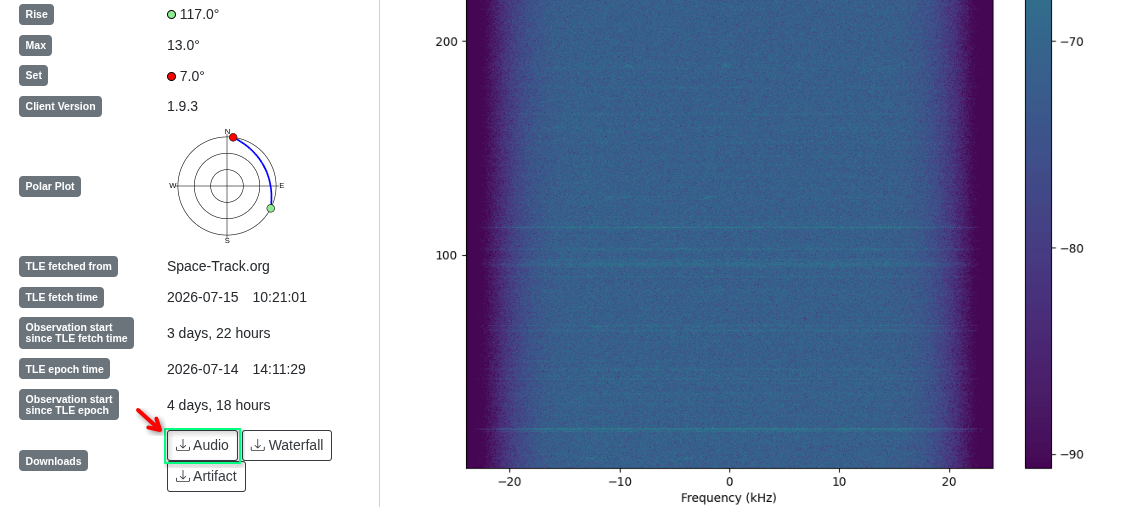
Step 2: Decode the Audio
gr-satellites supports SUCHAI satellites with the configuration added in the prerequisites. You can use either the command line or a custom flowgraph.
Using the Command Line (Recommended)
If you have downloaded a .ogg file, convert it to wav:
ffmpeg -i observation_XXXXX.ogg observation_XXXXX.wav
To decode a .wav file, run the following command in your terminal:
gr_satellites SUCHAI-4 --wavfile observation_XXXXX.wav
You will see the decoded packet structure in your terminal, for instance:
gr_satellites SUCHAI-4 --wavfile satnogs_14522671_2026-07-16T09-50-16.wav
-> Packet from 4k8 FSK downlink
Container:
    csp_header = Container:
        priority = 2
        source = 1
        destination = 30
        destination_port = 20
        source_port = 47
        reserved = 0
        fragmentation = False
        hmac = False
        xtea = False
        rdp = False
        crc = True
    com_frame = Container:
        n_frame = 0
        type = 105
        node = 1
        ndata = 1
    payload_id = 105
    payload = Container:
        index = 0
        timestamp = 2026-06-16 19:16:28
        dat_rtc_date_time = 2026-06-16 19:16:28
        dat_obc_last_reset = 4
        dat_obc_hrs_alive = 213
        dat_obc_hrs_wo_reset = 18
        dat_obc_reset_counter = 15
        dat_obc_executed_cmds = 148871
        dat_obc_failed_cmds = 25720
        dat_com_count_tm = 0
        dat_com_count_tc = 0
        dat_com_last_tc = 1780853973
...
Using GNU Radio Companion
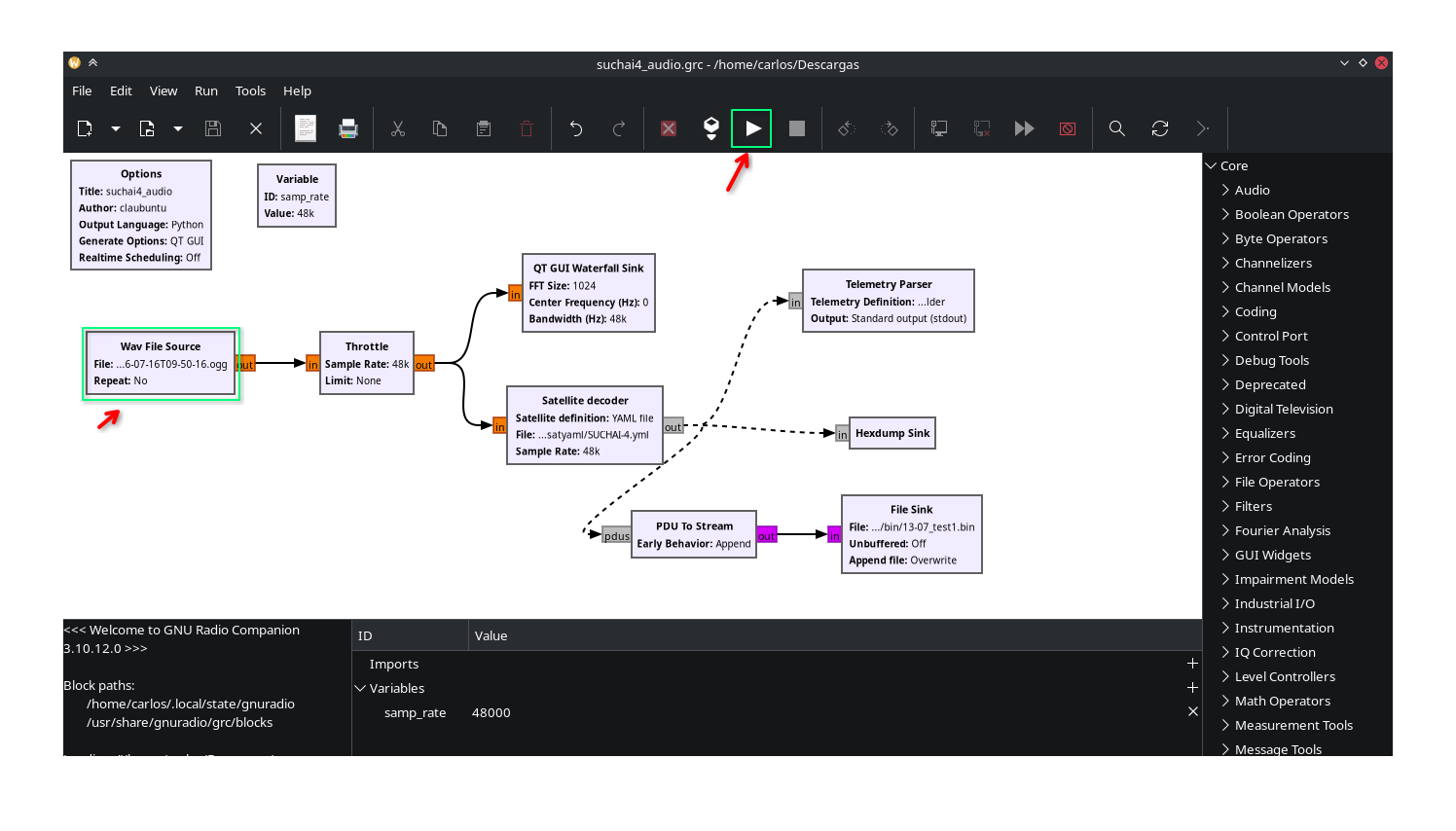
- Download our custom SUCHAI 4 GRC Flowgraph from our repository.
- Download: suchai4_audio.grc
- Open the
.grcfile in GNU Radio Companion. - Update the WAV File Source block to point to your downloaded file.
- Press Play (F5). The decoded hexadecimal frames will be printed in the console. Copy these hex strings and save them as a binary file.
Decode data observations
Step 1: Obtain Data Observations
- Visit the SUCHAI 4 SatNOGS Observations page:
- Look for observations marked as “Data” for example: Observation 14545265
- In the observation details, download the Data (.wav) file. This is the FM-demodulated signal containing the GMSK burst.
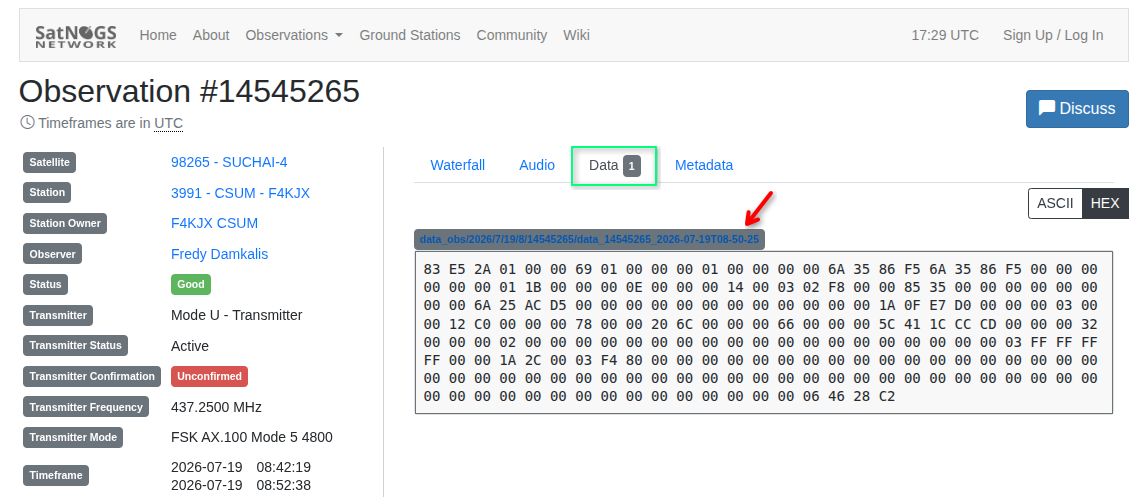
Step 2: Parse the Telemetry Data
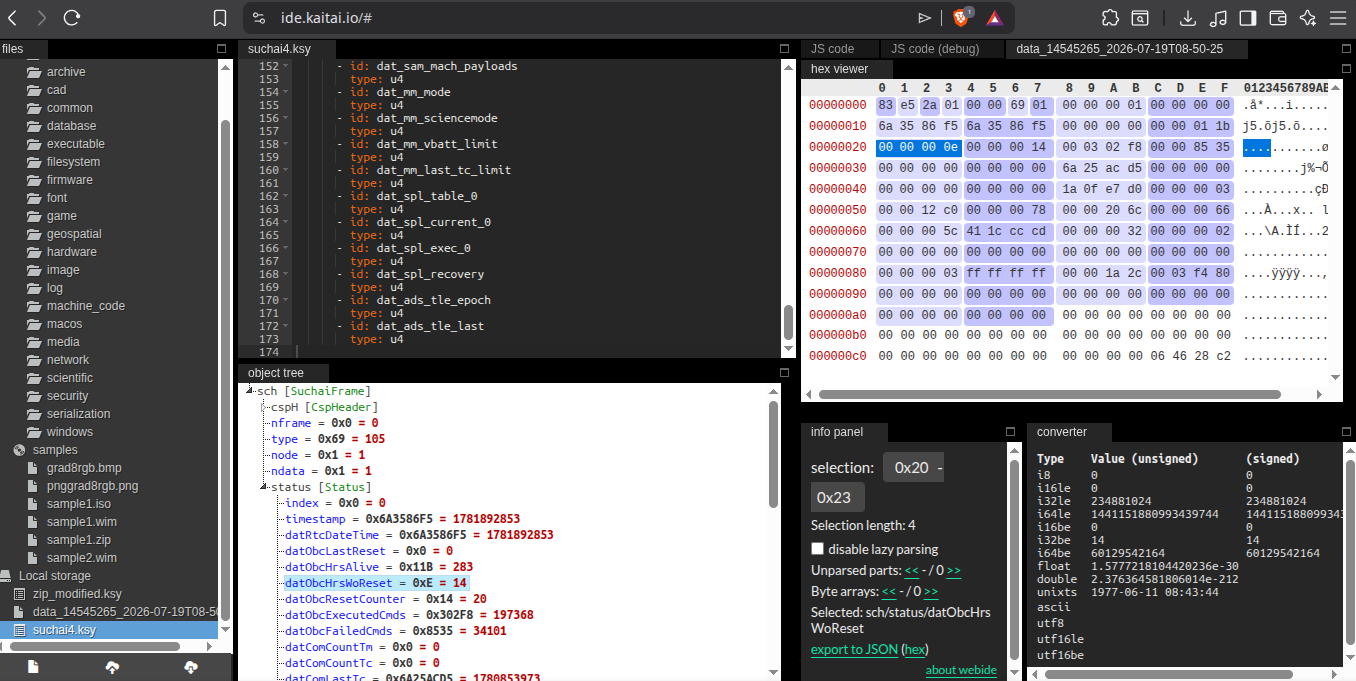
Binary data is hard to read. We use Kaitai Struct to map those bits to human-readable values like battery voltage, temperature, and orbit status.
- Get the Parser: Download the
suchai4.ksydefinition file from our SatNOGS Decoders repository- Download: suchai4.ksy
- Open the IDE: Go to ide.kaitai.io
- Upload:
- Drag and drop
suchai4.ksyinto the “Files” pane on the left. - Drag and drop your decoded binary file into the “Object Tree” pane.
- Drag and drop
- Analyze: The IDE will display a tree structure. You can click on fields like
eps_datato see real-time voltages orobc_datato check the satellite’s uptime.
Contributing Data
If you successfully decode a frame that hasn’t been uploaded to SatNOGS, please consider contributing!
- Community: Join the SatNOGS Community Forum to discuss SUCHAI 4 tracking.
Happy decoding!